Twist Snap
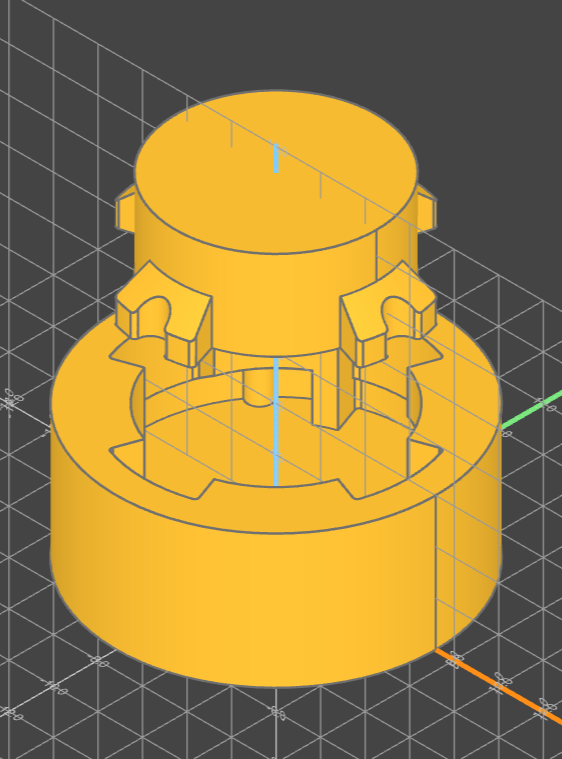
Overview
The twist_snap module provides two Part objects for generating twist-snap
connectors, useful for connections that are meant to be opened repeatedly.
All linear dimensions are in millimeters.
Clearance
TwistSnapConnector is built at nominal size. All fit clearance lives on the
socket, which opens its bore and snapfit recess by its own tolerance. That is
why the connector takes no tolerance argument: applying it to both halves would
double the gap.
Pass the same connector_radius, snapfit_radius_extension, snapfit_height,
arc_percentage and snapfit_count to both halves so they mate; only the socket
takes tolerance and wall_width.
TwistSnapConnector
arguments
connector_radius: the base radius of the connector mechanismarc_percentage: the percentage of the arc that the snapfit will coversnapfit_count: how many snapfit mechanisms to addsnapfit_radius_extension: how far beyond the connector the snapfit extendswall_depth: the depth of the wall mechanismsnapfit_height: the height of the snapfit mechanism
TwistSnapSocket
arguments
connector_radius: the base radius of the connector mechanismtolerance: the clearance between the connector and the socketarc_percentage: the percentage of the arc that the snapfit will coversnapfit_count: how many snapfit mechanisms to addsnapfit_radius_extension: how far beyond the connector the snapfit extendswall_width: the thickness of the wall mechanismwall_depth: the depth of the wall mechanismsnapfit_height: the height of the snapfit mechanism
Example
from build123d import Axis, Location
from b3dkit import TwistSnapConnector, TwistSnapSocket

connector = (
    TwistSnapConnector(
        connector_radius=4.5,
        snapfit_height=2,
        snapfit_radius_extension=2 * (2 / 3),
        wall_depth=2,
    )
    .rotate(Axis.X, 180)
    .move(Location((0, 0, 15)))
)

socket = TwistSnapSocket(
    connector_radius=4.5,
    tolerance=0.12,
    snapfit_height=2,
    snapfit_radius_extension=2 * (2 / 3),
    wall_width=2,
    wall_depth=2,
)